LensPilot · for wedding & event photographersThe guests at today's event
are your next customers.
Free for a month


Interactive Walkthrough
What it does
Step 1 of 6
Start with the shoot
A gallery belongs to a client and a shoot, so a wedding's Haldi, Sangeet and Reception sit together instead of as three loose links.
From the shoot to their screen — explore the complete 6-step workflow that delivers your photographs.
On every plan, including Free
AI Culling: we sort out the bad shots for you
Run it on a gallery, or let it check each upload as it lands, and it sorts out blurry, closed-eye & duplicate photos — the frames you would probably drop anyway. You make every call.


It flags the misses
You review, in one place
Nothing is deleted automatically
This is what your client sees
Meher & Co.
“This one for the album — crop it tighter?”
Send the link and PIN straight to WhatsApp, or a slideshow link the family can play on the TV.
Not a mockup — this is the software
These are captures of the running product. The studio is a demonstration account and the wedding in it is invented — the software is not.
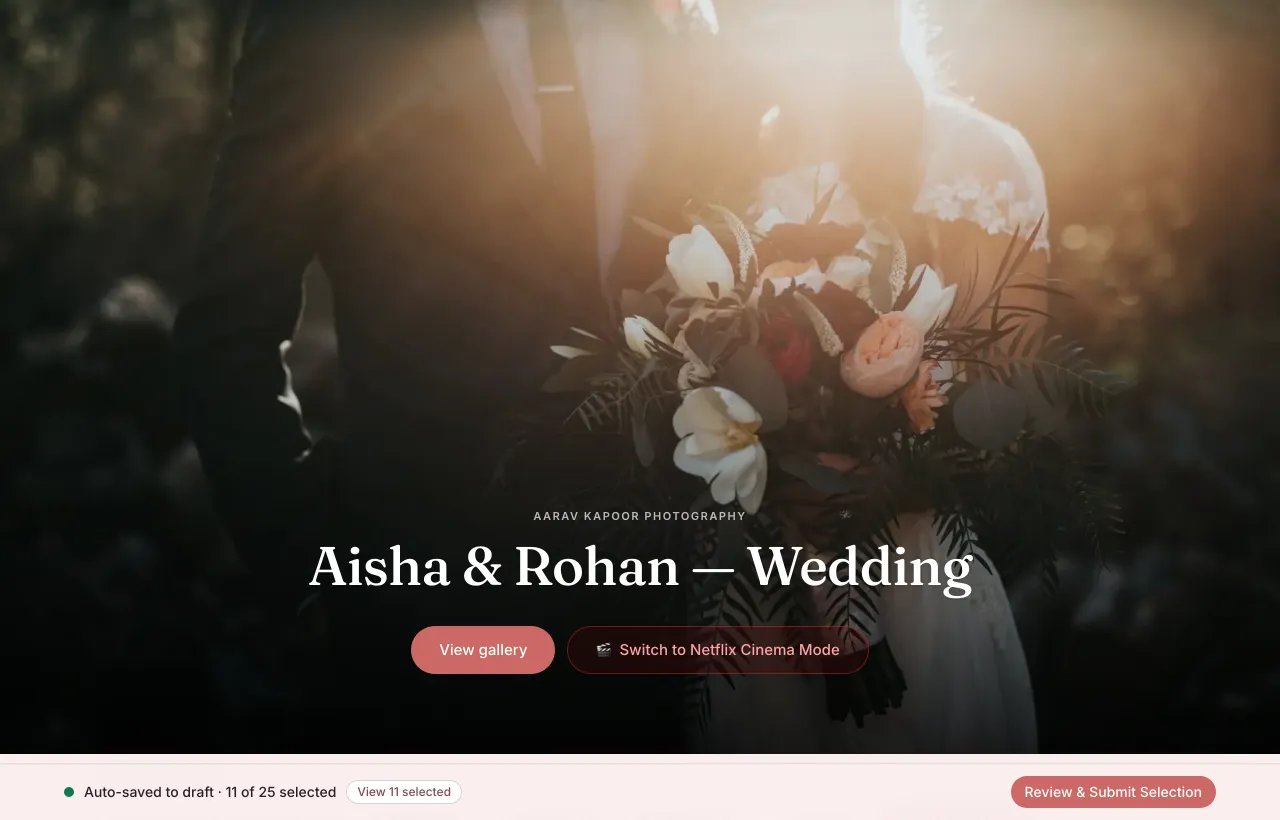
What the couple opens
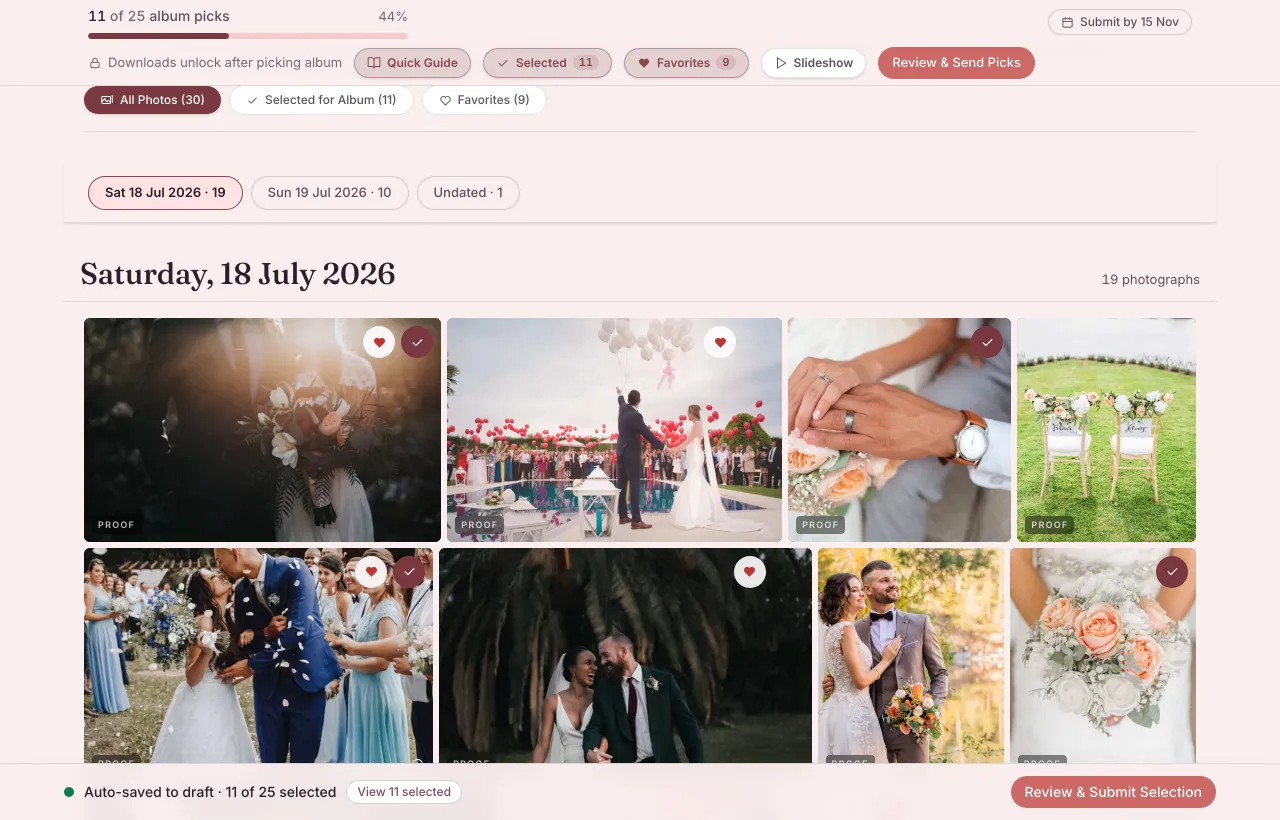
They pick on the frame itself
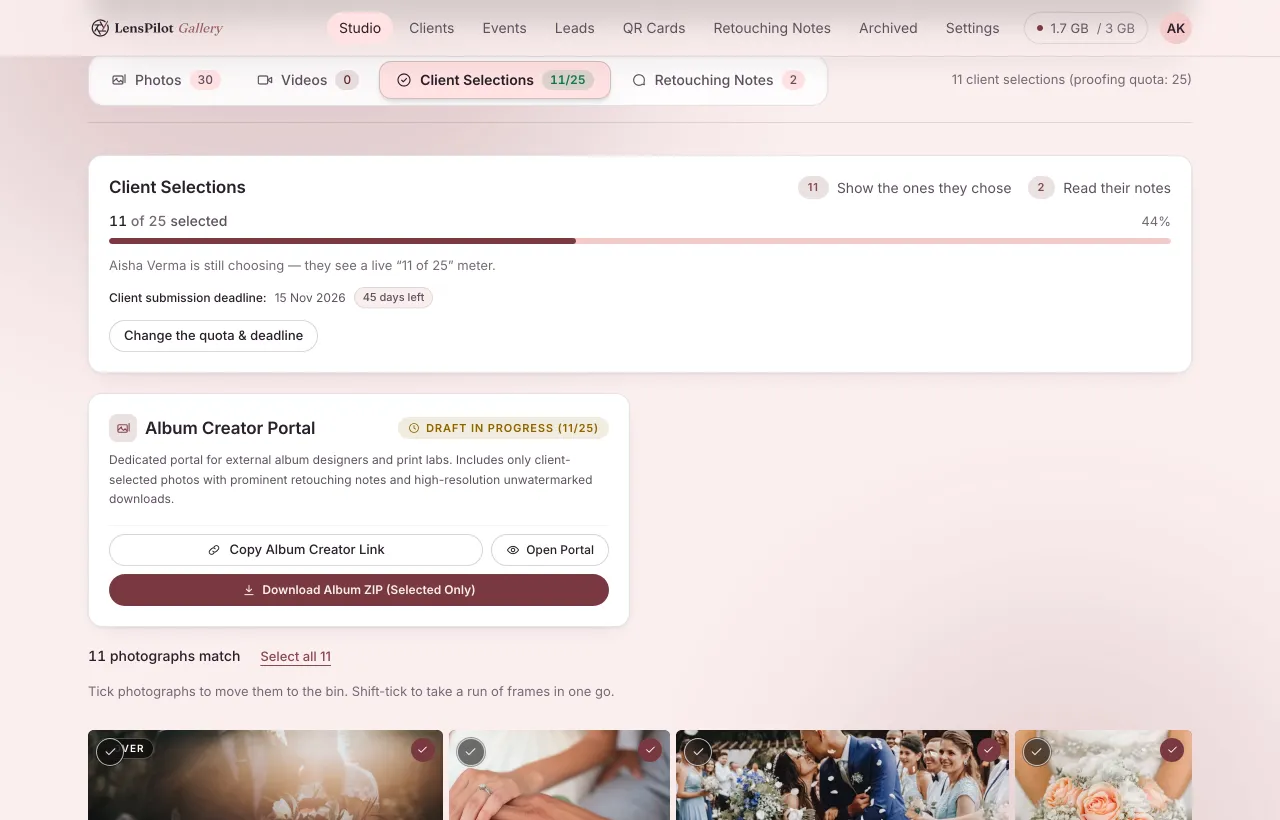
Your side of the same gallery
Films, in the same link
“Swap the background track here”
For every guest at the event
Guests stop asking you for their photos
The usual version of this is a month of messages, each one asking you to go and find four frames. This is the same request, answered by the guest.
- 1
They scan the card
- 2
They take one selfie
- 3
They get their own frames
- 4
You get the booking lead
Bringing the family?
Two ways to hand over a shoot
The left column is the delivery day most photographers already know. The right is what this does instead.
The usual way
Fragmented & slow
With LensPilot
Direct & automated
Photos upload to their website first, then slowly transfer to storage — you wait twice for the same upload.
Frames go from your machine straight to storage. Nothing slows them down, so 1 Gbps of internet uploads at 1 Gbps.
The link expires in a few days, and clients message you again months later asking for files.
The gallery stays up for the expiry you set — a year by default, changeable per gallery.
One copy, on one drive, on a shelf — and you find out it has died on the day you go looking for it.
Two copies, in two separate places. We check every month that we can restore the backup.
A long evening scrolling every frame of the shoot to throw out the blurry ones, the blinks and the repeats.
AI Culling sorts out blurry, closed-eye & duplicate photos, and flags too-dark or too-bright frames. You review and Delete the ones you don't want — they go to Recently deleted for 30 days. Nothing is deleted automatically.
"Which ones do you want?" — settled over confusing WhatsApp screenshots and filenames.
Picks and notes are left on the frame itself, so the shortlist is already organized in your grid.
Every guest who asks for their photos becomes your evening messaging headache.
Each one arrives as a lead on your dashboard instead of cluttering your inbox.
A monthly charge in foreign dollars, with hidden currency conversion fees added on.
Priced simply in rupees — and every feature is on every plan, including Free. You pay for storage, nothing else.
Getting booked
IncludedComes with every account. Clients reach your page from the link you send them — it is not listed anywhere for strangers to find.
The usual way
Fragmented & slow
With LensPilot
Direct & automated
An Instagram bio and "DM for prices".
Your own page with your portfolio and your packages, each with its price, and a clear "starting from" price at the top.
Spread across DMs, WhatsApp and calls.
One inbox with live chat. The client's message reaches only you, and they get a WhatsApp alert when you reply.
Prices typed into chat, and the terms forgotten.
Send one agreement from the chat — price, dates, deliverables and terms together — and they accept it online. Reuse your saved agreement templates.
A diary, and double bookings.
Booked days block themselves. Bookings, holds and blocked days show in your Google or iPhone Calendar.
Guesswork, after paying the team.
Earnings after team cuts and costs, by week, month or financial year — with an Excel download.
Pay for storage. The only extra is a seat.
Every feature is on every plan, including Free. Every plan includes 2 to 5 team seats; extra seats are ₹99 to ₹249 a month, up to 5 in all.
Keep one team list of everyone you work with, give them tasks on each shoot or gallery, and follow it all on a Work board. Crew who don't sign in don't use a seat.
₹0 / month · 1 month
₹333 / month₹3,990 billed every year · 2 months free
₹583 / month₹6,990 billed every year · 2 months free
₹1,249 / month₹14,990 billed every year · 2 months free
₹2,416 / month₹28,990 billed every year · 2 months free
₹4,583 / month₹54,990 billed every year · 2 months free
from ₹6,874 / monthfrom ₹82,490 billed every year · 2 months free
Bigger than 2 TB?
Storage is priced by the terabyte at one flat rate, whatever the size. Prepay 5.5 months for six, or 10 for twelve.
Full pricingStart with your next shoot
Before you upload a shoot
A question we could not answer straight is not on this list.
What happens when my plan ends?
Your studio locks that day; your clients' links keep working a further 7 days. After 30 days unpaid, your galleries are locked — previews stay, full-size downloads pause — and renewing unlocks them automatically within 48 hours. Only after about 6 more months unpaid are the galleries deleted, with WhatsApp warnings 30 and 7 days before. Renewing stops it at any point before that.
What do my clients need to install?
Nothing — a link and a four-digit PIN. No app and no account, and it keeps working at a venue when the signal drops. You can send the link and PIN together on WhatsApp.
Can I put galleries on my own domain?
Not today — galleries are served from this address. What your client sees is still your studio: your name, your cover, your watermark on every proof.
My internet is slow at the venue. Do I upload full size?
No. Pick High or Web & social and smaller copies go up instead. Swap in the full originals later — your client's picks and notes stay on every photo.
What is AI Culling?
It sorts out blurry, closed-eye & duplicate photos for you, so you don't have to hunt for them frame by frame. It flags blurry shots, closed eyes, too-dark or too-bright frames and burst duplicates, keeping the sharpest of each burst. You review and Delete the ones you don't want — they go to Recently deleted for 30 days. Nothing is deleted automatically. It's on every plan, including Free.
What if I delete a photo by mistake?
For 30 days it's in Recently deleted: restore it instantly, for free, with your client's picks and notes. Then it waits in your archive until 180 days after you deleted it, and you can bring it back yourself (10 GB a month free, then ₹50/GB). After that it's permanently deleted and non-recoverable, and we remind you 15, 7 and 1 day before.
Can I free up space without deleting a gallery?
Move it to your archive. It's locked: you and your client can still browse every photo in preview quality, and full-size downloads pause until you unlock it. 180 days after locking it's permanently deleted and non-recoverable, unless you unlock it first, and we remind you 15, 7 and 1 day before.
Do you publish or re-use my photographs?
No. Galleries are private links, never indexed. Portfolio use is off unless your client grants it, per gallery, and withdrawing it puts everything back to private.